Quick Picks
Short on time? Here are our top recommendations:
- Echo Dot (5th Gen) — Best voice control hub
- Amazon Smart Thermostat — Best budget thermostat
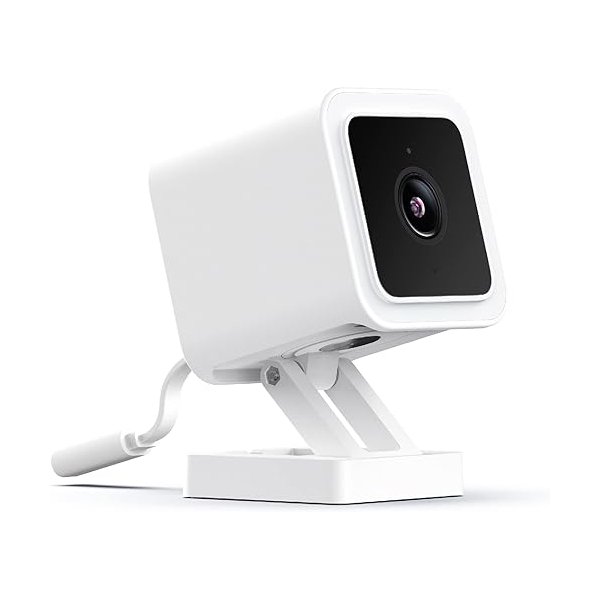
- Wyze Cam v3 — Best budget camera
- Wyze Bulb Color — Best budget smart bulbs
This article contains affiliate links. We may earn a commission at no extra cost to you.
🏆 Complete Smart Home Bundle Under $500
Total Cost: $485
• Voice Control: Echo Dot ($50)
• Smart Display: Echo Show 5 ($90)
• Security Camera: Wyze Cam v3 x2 ($70)
• Smart Bulbs: Wyze Bulb Color x4 ($60)
• Smart Plugs: Kasa Smart Plug Mini x4 ($48)
• Smart Thermostat: Amazon Smart Thermostat ($80)
• Video Doorbell: Ring Video Doorbell ($100)
Why This Bundle Works:
✅ Complete coverage: Voice control, lighting, security, climate, and entry monitoring
✅ All Alexa compatible: Everything works together seamlessly
✅ No subscriptions required: Local storage options on all cameras
✅ Easy DIY install: Everything installs in under 4 hours
✅ Room to grow: $15 left for extras or saved for future additions
Want to experience the convenience of a smart home without breaking the bank? You’re not alone. Many people assume that smart home technology requires thousands of dollars in investment, but that’s simply not true in 2026. With the right strategy and product selection, you can build a comprehensive smart home setup under $500 that covers all the essentials—lighting, security, climate control, and entertainment.
This guide breaks down exactly how to maximize your budget, which devices to prioritize, and how to create a cohesive smart home ecosystem that actually makes your daily life easier. Whether you’re a complete beginner or looking to upgrade on a budget, you’ll find actionable recommendations that deliver real value without the premium price tag.
Why 2026 Is the Perfect Time for Budget Smart Homes
The smart home market has matured significantly, and 2026 brings unprecedented value for budget-conscious buyers. Major brands now offer feature-rich devices at accessible price points, while increased competition has driven prices down across the board.
According to industry reports, the average cost of smart home devices has decreased by approximately 30% over the past three years while functionality has improved. This means your $500 budget now stretches much further than it would have just a few years ago.
Additionally, compatibility between different brands has improved dramatically. Matter protocol support, which launched in late 2022, has become standard in most new devices, making it easier to mix and match products without ecosystem lock-in.
Building Your Smart Home Strategy: What to Prioritize
The Foundation: Choose Your Ecosystem
Before purchasing any devices, you need to decide on your control hub. This decision will influence your entire smart home setup under $500, so it’s worth careful consideration.
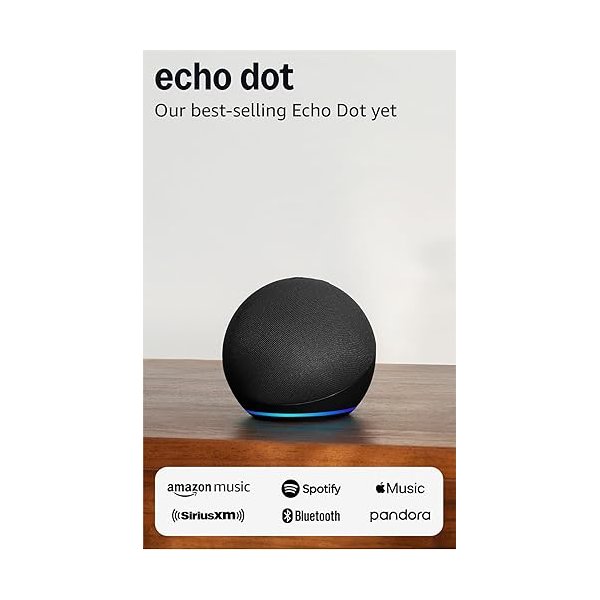
Amazon Alexa remains the most budget-friendly option, with Echo Dot devices regularly available under $30. The Alexa ecosystem offers the widest selection of compatible third-party devices at various price points.
Google Home provides superior voice recognition and seamless integration with Google services. Google Nest Mini devices compete directly with Echo Dots on price while offering better natural language processing based on user reviews.
Apple HomeKit delivers robust security and privacy features but typically costs more. If you’re already invested in Apple devices, you can use your iPhone or iPad as a control hub, though a HomePod mini ($99) provides always-on voice control.
The Essential Device Categories
For a functional smart home under $500, focus on these four categories that deliver the most daily value:
- Smart lighting (Budget allocation: $100-150)
- Smart security (Budget allocation: $150-200)
- Smart climate control (Budget allocation: $80-100)
- Smart speakers/displays (Budget allocation: $50-100)
This leaves $50-120 for additional conveniences or to upgrade one category based on your priorities.
Complete Smart Home Setup Under $500: Recommended Configuration
Configuration #1: The Amazon Alexa Ecosystem Build
This setup maximizes device count and functionality using Amazon’s ecosystem, which offers the best value for budget builds according to price comparisons across major retailers.
| Device Category | Product | Approximate Price | Purpose |
|---|---|---|---|
| Voice Control Hub | Echo Dot (5th Gen) x2 | $60 | Voice control in living room and bedroom |
| Smart Lighting | Wyze Color Bulbs (4-pack) | $35 | Primary living spaces |
| Smart Lighting | Govee LED Light Strip | $25 | Accent lighting |
| Smart Plug | Kasa Smart Plug Mini (4-pack) | $25 | Control lamps and appliances |
| Security Camera | Wyze Cam v3 x2 | $70 | Indoor/outdoor monitoring |
| Video Doorbell | Wyze Video Doorbell v2 | $35 | Front door security |
| Smart Lock | Wyze Lock Bolt | $70 | Keyless entry |
| Smart Thermostat | Amazon Smart Thermostat | $80 | Climate control |
| Smart Display | Echo Show 5 (3rd Gen) | $50 | Kitchen control center |
| Total | $450 |
This configuration leaves $50 for sales tax or additional devices like smart smoke detectors or contact sensors.
Configuration #2: The Google Home Value Build
For those preferring Google’s ecosystem, this setup prioritizes Google Assistant integration while maintaining comprehensive coverage.
| Device Category | Product | Approximate Price | Purpose |
|---|---|---|---|
| Voice Control Hub | Google Nest Mini x2 | $50 | Multi-room voice control |
| Smart Display | Google Nest Hub (2nd Gen) | $100 | Visual control center |
| Smart Lighting | Govee RGBIC LED Bulbs (4-pack) | $40 | Main room lighting |
| Smart Plug | Gosund Smart Plug (4-pack) | $20 | Appliance control |
| Security Camera | TP-Link Tapo C200 x2 | $60 | Indoor security |
| Video Doorbell | TP-Link Tapo D230S1 | $80 | Doorbell with chime |
| Smart Thermostat | Google Nest Thermostat | $130 | Energy-efficient climate control |
| Total | $480 |
This build invests more heavily in the thermostat and display, which serve as central control points for Google ecosystem management.
Configuration #3: The Security-Focused Build
If home security is your primary concern, this configuration maximizes protection while staying within budget.
| Device Category | Product | Approximate Price | Purpose |
|---|---|---|---|
| Voice Control Hub | Echo Dot (5th Gen) | $30 | Voice control |
| Smart Lighting | Sengled Smart Bulbs (4-pack) | $30 | Lighting automation |
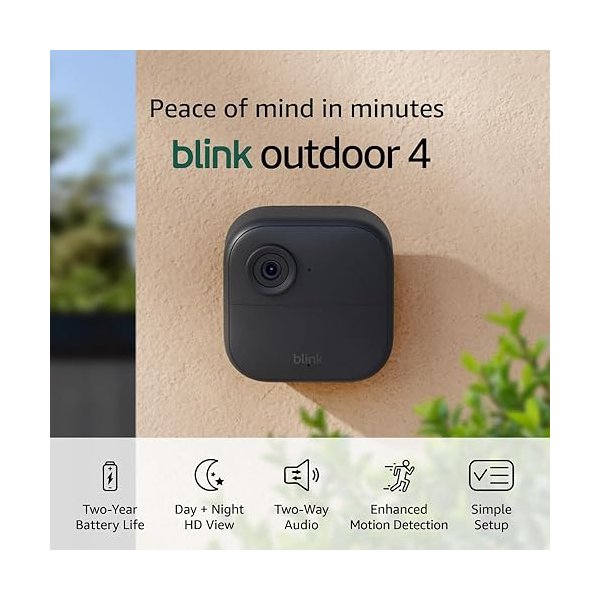
| Security Camera | Blink Outdoor 4 (3-pack) | $150 | Perimeter monitoring |
| Video Doorbell | Ring Video Doorbell (2nd Gen) | $100 | Front door with monitoring |
| Smart Lock | August Wi-Fi Smart Lock | $150 | Advanced access control |
| Contact Sensors | Wyze Contact Sensor (4-pack) | $20 | Window/door monitoring |
| Smart Plug | Amazon Smart Plug x2 | $20 | Lighting simulation |
| Total | $500 |
This setup provides comprehensive security coverage with multiple camera angles, entry monitoring, and smart lock integration.
Device-by-Device Deep Dive
Smart Speakers and Displays: Your Control Center
Echo Dot (5th Generation) – Price: ~$30 (often on sale for $20) – Pros: Improved audio over previous generations, temperature sensor included, Matter support – Cons: Limited smart home device management without subscription for some features – Verdict: The best entry-level hub for budget smart home setups based on feature-to-price ratio
Google Nest Mini (2nd Gen) – Price: ~$25-30 – Pros: Superior voice recognition, wall-mountable, excellent for Google service users – Cons: Smaller ecosystem of budget devices compared to Alexa – Verdict: Choose this if you’re heavily invested in Google’s ecosystem or prioritize voice accuracy
Echo Show 5 (3rd Gen) – Price: ~$50-90 – Pros: Visual interface for camera feeds, recipes, and controls; built-in camera for video calls – Cons: Small screen limits some use cases – Verdict: Excellent kitchen or bedroom control panel that adds significant functionality for the price
Smart Lighting: Transform Your Ambiance
Smart lighting delivers the most immediate “wow factor” in any smart home setup under $500. The ability to control lights by voice, schedule them, or sync them with entertainment creates tangible value.
Wyze Bulb Color – Price: ~$9 per bulb, ~$35 for 4-pack – Pros: No hub required, 16 million colors, works with Alexa and Google, scheduled lighting – Cons: No HomeKit support, requires 2.4GHz Wi-Fi – Verdict: Unbeatable value for color-changing bulbs based on cost per lumen and features
Govee RGBIC LED Strips – Price: ~$25-40 depending on length – Pros: Segmented color control, music sync, multiple preset scenes, app and voice control – Cons: Some users report connectivity issues, adhesive may need reinforcement – Verdict: Creates dramatic accent lighting for entertainment areas at a fraction of premium brand costs
Kasa Smart Plug Mini – Price: ~$25 for 4-pack – Pros: Converts any lamp to smart control, compact design, energy monitoring, scheduling – Cons: Each plug requires individual setup – Verdict: Essential for controlling existing lamps and appliances without replacing bulbs
Smart Security: Protect What Matters
Security devices often represent the largest investment in a smart home setup under $500, but they provide irreplaceable peace of mind.
Wyze Cam v3 – Price: ~$35 per camera – Pros: Color night vision, weather-resistant, continuous recording with SD card, person detection – Cons: Cloud storage requires subscription ($2/month per camera), connectivity can be inconsistent according to user reviews – Verdict: The most capable budget camera available, though consider subscription costs long-term
Blink Outdoor 4 – Price: ~$100 for 3-pack with sync module – Pros: Two-year battery life, free cloud storage (limited), Amazon ecosystem integration – Cons: Lower video quality than some competitors, no continuous recording – Verdict: Best for truly wireless outdoor monitoring where running power isn’t feasible
Wyze Video Doorbell v2 – Price: ~$35 – Pros: 1080p HD, two-way audio, package detection, existing chime integration – Cons: Requires existing doorbell wiring, cloud storage subscription for full features – Verdict: Remarkable value for essential doorbell features at a fraction of Ring’s cost
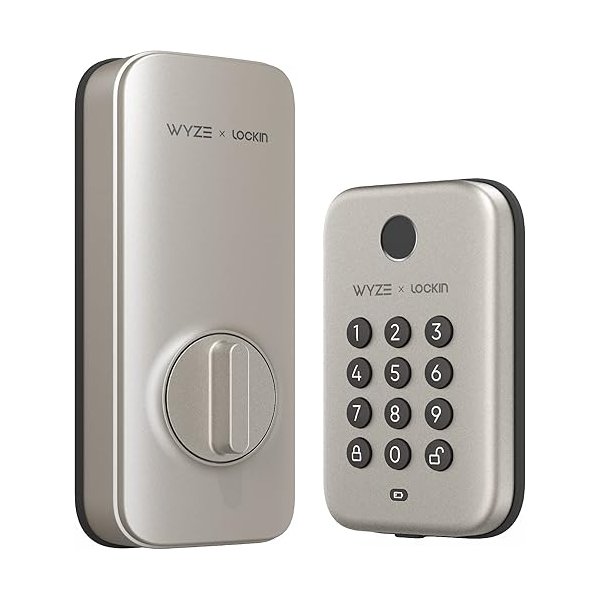
Wyze Lock Bolt – Price: ~$70 – Pros: Easy installation (replaces interior side only), keypad entry, auto-lock, remote control via gateway – Cons: Requires separate gateway ($20) for remote features, not as robust as premium locks – Verdict: Affordable keyless entry that doesn’t require professional installation
Smart Climate Control: Comfort and Savings
A smart thermostat often pays for itself through energy savings, making it a wise investment in any smart home setup under $500.
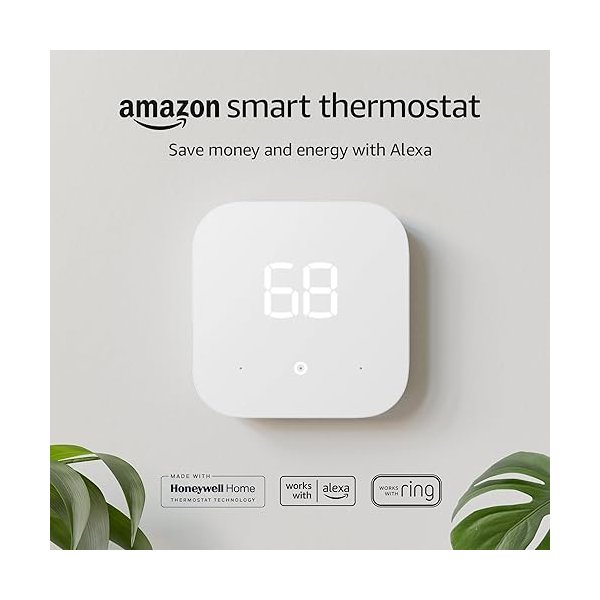
Amazon Smart Thermostat – Price: ~$80 (often discounted with utility rebates) – Pros: Certified to save energy, Alexa-controlled, Honeywell reliability, simple setup – Cons: Basic features compared to premium thermostats, no learning capabilities – Verdict: Best budget option that delivers essential smart features and proven energy savings
Google Nest Thermostat – Price: ~$130 – Pros: Attractive design, energy savings reports, learning capability, remote sensors compatible – Cons: Higher price point eats into device budget, some features require subscription – Verdict: Worth the premium if climate control is a priority and you value design aesthetics
Govee Smart Hygrometer Thermometer (4-pack) – Price: ~$35 for 4-pack – Pros: Monitor temperature and humidity in multiple rooms, alerts, data export – Cons: Monitoring only—no control functions – Verdict: Inexpensive way to understand your home’s climate patterns and optimize HVAC usage
Smart Home Setup Under $500: Step-by-Step Installation Guide
Week 1: Foundation Setup
Start with your voice assistant ecosystem. Set up your Echo Dot or Google Nest Mini in your primary living space first. This allows you to test voice control and become familiar with basic commands before expanding.
Download the corresponding app (Amazon Alexa or Google Home) and complete the initial setup. Connect to your Wi-Fi network and customize your preferences. This foundational step takes about 15-30 minutes.
Next, add your smart display if your budget includes one. Position it in a central location like the kitchen where you’ll frequently interact with it for recipes, weather, and device control.
Week 2: Smart Lighting Installation
Begin with smart bulbs in your most-used rooms. Replace existing bulbs in living room lamps, bedroom fixtures, and dining areas. Add them to your ecosystem app by following the manufacturer’s instructions—typically this involves toggling the light switch and using the app to discover devices.
Install smart plugs for lamps that have specialty bulbs you don’t want to replace. These take seconds to set up and provide immediate control.
Create your first automation: “Lights off at 11 PM” or “Living room lights on at sunset.” This demonstrates the practical value of your smart home setup.
Week 3: Security Device Installation
Mount security cameras according to your priority areas. For most homes, this means front door coverage, backyard monitoring, and perhaps a side gate or garage view.
Install your video doorbell, which typically requires connecting to existing doorbell wiring. If you’re uncomfortable with electrical work, this is the one device that might warrant professional installation (typically $50-100).
Add your smart lock and test it thoroughly before relying on it exclusively. Keep your traditional keys accessible during the break-in period.
Week 4: Climate Control and Optimization
Install your smart thermostat last, as it requires the most significant installation effort. Most smart thermostats include installation guides with step-by-step instructions, but verify your HVAC compatibility first using the manufacturer’s online tool.
After installation, spend a week monitoring your heating and cooling patterns through the app. Adjust schedules based on your actual occupancy rather than assumptions.
Finally, create scenes and automations that tie everything together: “Good morning” routine that adjusts temperature, opens blinds (if you added smart shades), and starts your coffee maker.
Maximizing Value: Money-Saving Strategies
Shop Strategic Sales Events
Smart home devices see significant discounts during Prime Day (July), Black Friday, and Cyber Monday. Planning your smart home setup under $500 around these events can increase your device count by 30-40%.
Sign up for price tracking tools like CamelCamelCamel for Amazon products or Honey for multiple retailers. Set alerts for your target devices at your budget price points.
Many utility companies offer rebates for smart thermostats and energy monitoring devices. Check your provider’s website before purchasing—these rebates can range from $25-100, effectively giving you a free device.
Start with Bundles
Manufacturers often bundle devices at significant discounts. Amazon regularly offers Echo + smart bulb bundles for less than buying separately. Ring offers doorbell + camera bundles that save $50-100.
Multi-packs almost always offer better per-unit pricing. A 4-pack of smart bulbs typically costs 25-30% less per bulb than buying individually.
Prioritize Multi-Function Devices
Choose devices that serve multiple purposes. For example, the Echo Dot (5th Gen) includes a temperature sensor, eliminating the need for separate room sensors. The Echo Show 5 serves as a display, camera, and speaker.
Smart plugs with energy monitoring add functionality without additional cost. You gain both control and insight into energy usage for optimization.
Consider Certified Refurbished
Amazon, Google, and other major manufacturers offer certified refurbished devices at 20-40% discounts. These typically include full warranties and are indistinguishable from new in functionality.
According to user reviews, failure rates for certified refurbished smart home devices are comparable to new products, making this an excellent budget-stretching strategy.
Common Pitfalls to Avoid
Wi-Fi Network Limitations
Most budget smart home devices require 2.4GHz Wi-Fi, which has better range but slower speeds than 5GHz. Ensure your router broadcasts both frequencies and that your 2.4GHz channel isn’t overcrowded.
If you live in an apartment complex with dozens of competing networks, consider a Wi-Fi mesh system before investing in smart devices. A weak network will create frustrating connectivity issues that undermine your smart home experience.
Subscription Creep
Many security cameras offer basic functionality free but charge monthly fees for cloud storage, advanced AI detection, or extended video history. A $30 camera with a $10/month subscription costs $150 in the first year alone.
Calculate total first-year costs including subscriptions when comparing products. Sometimes a more expensive camera with free storage (like Blink) offers better long-term value than a cheaper camera with mandatory subscriptions.
Ecosystem Lock-In
While building within a single ecosystem (all Amazon or all Google) ensures compatibility,