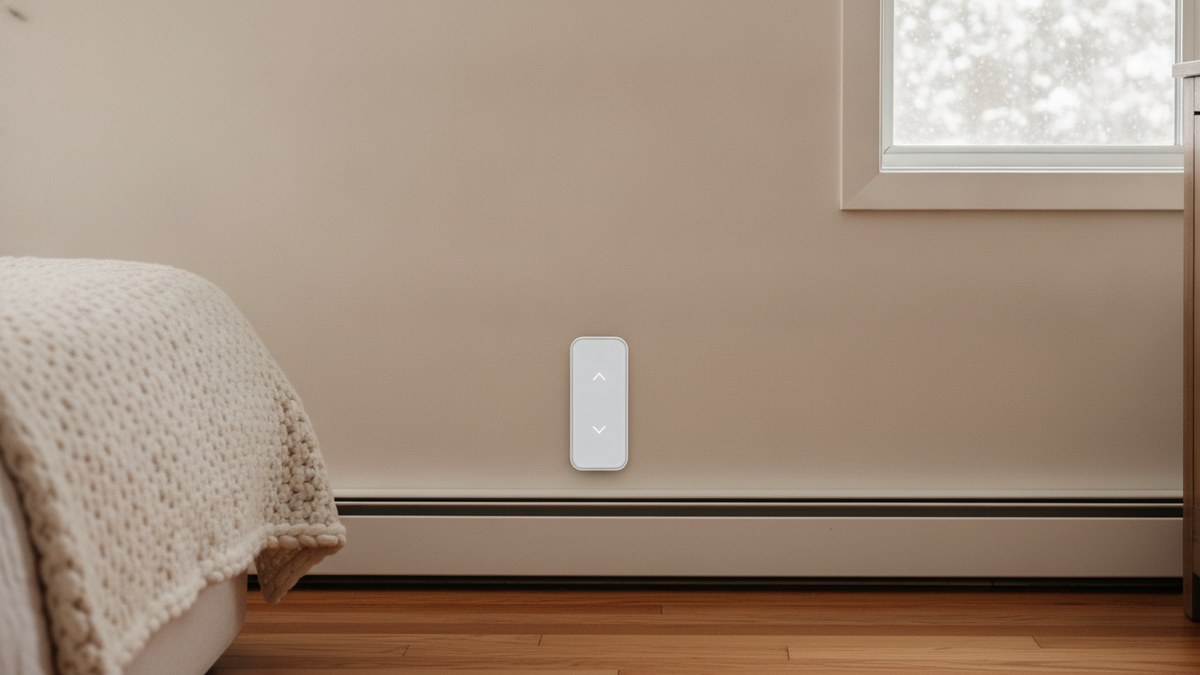
Quick Picks
Short on time? Here are the best smart thermostats for electric baseboard heat in 2026:
- Mysa Smart Thermostat V2 (~$160) — Best overall
- Mysa Smart Thermostat LITE (~$100) — Best value
- meross Matter Smart Thermostat (~$80) — Best for Matter homes
- meross Smart Thermostat (HomeKit) (~$75) — Best budget
- Mysa Smart Thermostat V2 Black Edition (~$160) — Best for dark decor
If your home is heated with electric baseboards, you’ve probably already found out the hard way that a Nest or ecobee won’t work. Those thermostats are built for low-voltage (24V) furnace and heat pump systems. Baseboard heaters run on line voltage: 120V or 240V going straight through the thermostat on the wall. Plug a regular smart thermostat into that and you’ll destroy it, or worse.
That’s a shame, because baseboard heat is exactly where a smart thermostat pays off most. Electric resistance heat is one of the most expensive ways to warm a home, and most baseboard systems are controlled by a clunky mechanical dial in every room that nobody remembers to turn down. A line-voltage smart thermostat gives each room a real schedule, lets you set back the heat when you leave, and shows you which rooms are burning the most electricity. Since most homes have one thermostat per room, the savings add up across the house.
This guide covers only thermostats actually designed for 120–240V electric baseboard heat. We verified each listing on Amazon and checked the wiring requirements, because that’s where most buyers get burned. If your home has a furnace, boiler, or heat pump instead, our guide to the best smart thermostats is the one you want.
Before You Buy: Check Your Wiring
Every thermostat in this guide needs four wires in the wall box: two going to the heater and two coming from the power supply. That includes a neutral or a second live wire to power the thermostat’s WiFi. Many older baseboard installs use simple two-wire thermostats, and smart thermostats will not work with those without rewiring.
To check, switch off the heater’s breaker (not just the thermostat), remove the old thermostat’s cover, and count the wires attached to it. Four (or more) means you’re in good shape. Two means you’ll need an electrician or a different approach. Also check the load: add up the wattage of the heaters on that thermostat (it’s printed on each heater’s label) and make sure it’s under the thermostat’s limit. That’s about 1,900W at 120V or 3,800W at 240V for all of our picks.
Safety note: this is 240V mains wiring. Always turn off the breaker and confirm the power is off with a non-contact voltage tester before touching anything. If you’re not comfortable with that, an electrician can swap several thermostats in an hour or two, and it’s money well spent. Renters should check with their landlord first; our guide on installing a smart thermostat in an apartment covers how to have that conversation.
The Best Smart Thermostats for Baseboard Heaters
Mysa Smart Thermostat V2 — Best Overall
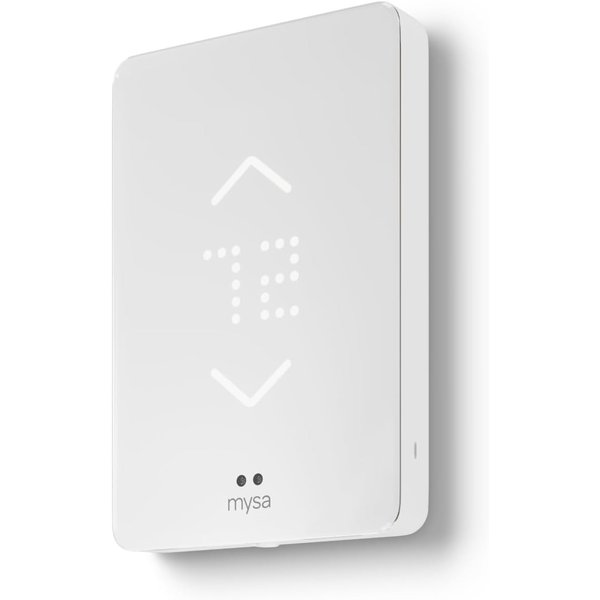
Mysa is the brand that made line-voltage smart thermostats good, and the V2 is still the one to beat. It’s a slim, minimalist touchscreen with a glowing dot display that dims at night and wakes up when you walk toward it. It looks far nicer than the beige box it replaces. It handles 120V and 240V electric baseboards and fan-forced wall heaters, up to 1,900W at 120V or 3,800W at 240V.
What sets it apart is the app. Setting a schedule takes about a minute, geofencing can turn the heat down when everyone leaves, and you get per-room energy usage reports, so you can see that, say, the spare bedroom is quietly eating your bill. It works with Alexa, Google Assistant, and Apple HomeKit, connects directly to WiFi with no hub, and every feature is free with no subscription. A built-in humidity sensor gives more accurate comfort readings, and Mysa backs it with a 5-year warranty. With well over a thousand reviews averaging 4.5 stars, it’s the proven choice. Most people outfitting a whole house should start here.
Pros:
- Best app in the category: schedules, geofencing, per-room energy reports
- Alexa, Google Assistant, and Apple HomeKit
- Attractive, compact design with adaptive brightness
- Humidity sensor for better comfort readings
- No subscription, 5-year warranty
Cons:
- Pricier per room than meross
- Needs four wires — no two-wire installs
- Most settings live in the app, not on the wall unit
Mysa Smart Thermostat LITE — Best Value
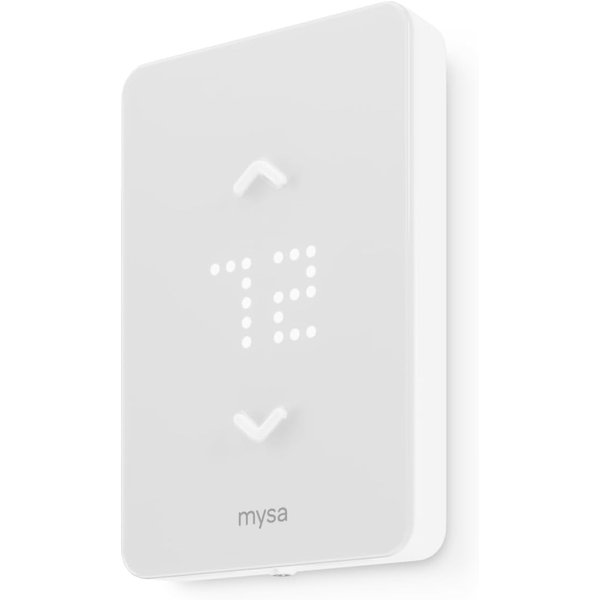
The LITE is Mysa’s answer to the biggest objection to baseboard smart thermostats: you need one per room, and that gets expensive fast. It costs about $60 less than the V2 and keeps the parts that actually save money: the same Mysa app, 7-day scheduling, remote control from anywhere, and voice control through HomeKit, Alexa, and Google Home. It drops the V2’s humidity sensor and premium adaptive display.
It works with 120V, 208V, and 240V baseboards, fan-forced heaters, wall heaters, and convectors, in single-pole or double-pole setups, and it connects straight to WiFi with no hub. You also get monthly per-room runtime reports by email, the same no-subscription policy, and the same 5-year warranty. Our favorite strategy: put a V2 in the rooms you see every day, like the living room and main bedroom, and LITEs in the garage, basement, guest room, and workshop. You’ll get a consistent system in one app for a lot less money.
Pros:
- Same app, scheduling, and voice support as the V2
- About $60 cheaper per room
- Works with 120V, 208V, and 240V
- Great for garages, basements, and guest rooms
- No subscription, 5-year warranty
Cons:
- No humidity sensor
- Simpler display than the V2
- Still needs four-wire wiring
meross Matter Smart Thermostat — Best for Matter Homes
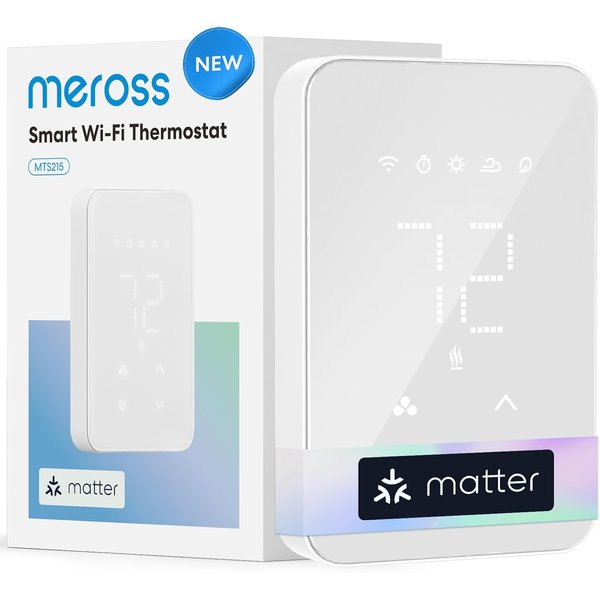
meross’s newest baseboard thermostat leads with Matter support, which means it can join Alexa, Apple Home, Google Home, and SmartThings at the same time, with no ecosystem lock-in. If your household mixes iPhones and Android phones, or you’re building a smart home you want to keep flexible, that’s a real advantage. You can still use the meross app over WiFi for full control from anywhere.
It covers 120–240V baseboards, convectors, and fan-forced heaters. Two features stand out at this price. Real-time energy monitoring shows actual electricity use, not just runtime. Open-window detection pauses heating when a sudden temperature drop suggests a window is open, so you’re not heating the outdoors. Visual 24/7 scheduling rounds it out. It’s newer, with fewer reviews than Mysa, but the early rating is strong, and it undercuts the Mysa V2 by roughly half.
Pros:
- Matter: works with Alexa, Apple Home, Google, and SmartThings at once
- Real-time energy monitoring
- Open-window detection
- About half the price of the Mysa V2
Cons:
- Newer product with fewer reviews
- App and design less polished than Mysa
- Four wires required
meross Smart Thermostat (HomeKit) — Best Budget
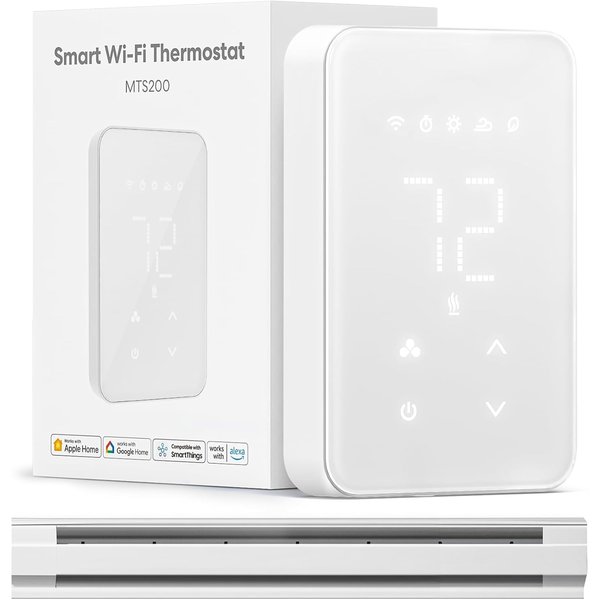
The cheapest way to get real smart control over baseboard heat. This meross model handles electric baseboards, convectors, fan-forced heaters, and in-ceiling radiant heat up to 16A, about 1,920W at 120V or 3,840W at 240V. It works with Apple Home, Alexa, Google Home, and SmartThings. A clean white LCD and touch controls keep it simple on the wall, and the meross app gives you a 7x24 graphic schedule.
Like its Matter sibling, it includes energy monitoring and open-window detection, which is unusual at this price. It can also trigger other devices: turn on a lamp or a fan when a room hits a set temperature, for example. It holds your settings through power outages, and it’s adjustable from 41°F to 95°F in 1-degree steps. Reviews are a bit more mixed than Mysa’s (4.2 stars), mostly around app polish and setup. But if you’re doing six or eight rooms on a budget, the savings over Mysa are significant.
Pros:
- Lowest price per room
- Apple Home, Alexa, Google, and SmartThings
- Energy monitoring and open-window detection
- Can trigger other smart devices by temperature
Cons:
- Lower review average than Mysa
- Older, less refined app experience
- Four wires required
Mysa Smart Thermostat V2 Black Edition — Best for Dark Decor
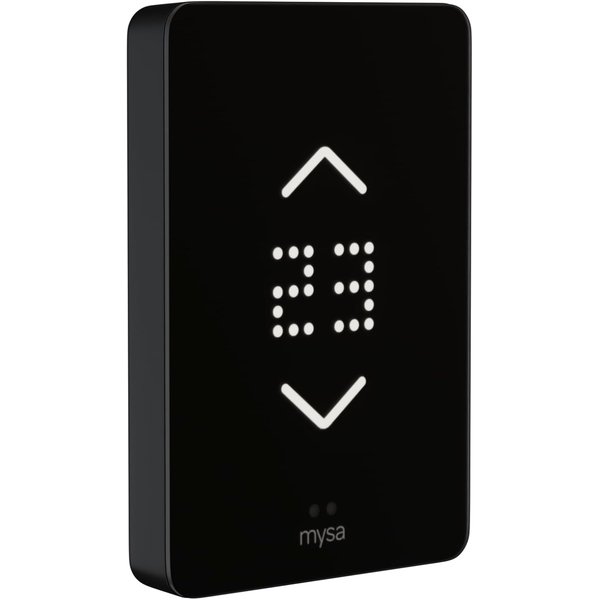
This is the Mysa V2, our top pick, in matte black. Same humidity sensor, same adaptive touchscreen that dims at night and wakes on approach, same app with schedules, geofencing, and per-room energy tracking, and the same HomeKit, Alexa, and Google support. It also lists support for self-contained hydronic baseboards and in-ceiling radiant heaters alongside standard electric baseboards and fan-forced wall heaters.
There’s no functional reason to pick it over the white V2. It’s purely about looks. A white thermostat on a dark accent wall, or in a modern room with black hardware and fixtures, sticks out; the Black Edition disappears. It’s usually priced about the same as the white model, so if it suits your space better, there’s no penalty for choosing it.
Pros:
- All of the Mysa V2’s features
- Matte black blends into dark walls and modern decor
- Lists hydronic baseboard and radiant ceiling support
- No subscription, 5-year warranty
Cons:
- Same price premium as the white V2
- Shows dust and fingerprints more than white
- Four wires required
Baseboard Smart Thermostat Comparison
| Product | Best For | Price | Voltage | Ecosystems | Energy Data |
|---|---|---|---|---|---|
| Mysa V2 | Overall | ~$160 | 120–240V | HomeKit, Alexa, Google | Per-room usage reports |
| Mysa LITE | Value | ~$100 | 120/208/240V | HomeKit, Alexa, Google | Monthly runtime reports |
| meross Matter | Matter homes | ~$80 | 120–240V | Matter (Alexa, Apple, Google, SmartThings) | Real-time monitoring |
| meross (HomeKit) | Budget | ~$75 | 120–240V | Apple Home, Alexa, Google, SmartThings | Real-time monitoring |
| Mysa V2 Black | Dark decor | ~$160 | 120–240V | HomeKit, Alexa, Google | Per-room usage reports |
How Much Can You Save?
Mysa says its scheduling can cut electric heating costs by up to 26%. Your real number depends on your climate, your rates, and how well you stick to a schedule. The math is simple: electric baseboard heat is pure resistance heating, so every hour a room isn’t heated is money you don’t spend. The biggest wins come from setting rooms back while you sleep or work, keeping unused rooms (guest rooms, basements) cool, and not heating the house while you’re away. A mechanical dial can’t do any of that unless you remember to do it by hand, every day, in every room.
Because you pay per room, start with the spaces that run the most: the living area and bedrooms. Then add the rest as budget allows. If you have a room heated by a portable heater instead, see our guide to smart space heaters for app-controlled options with the safety features that matter.
How to Choose
Want the best experience? Get the Mysa V2. Its app is the best in the category, and the per-room energy reports actually change how you heat your home.
Outfitting a lot of rooms? Mix Mysa V2 in the main rooms with Mysa LITE everywhere else. It’s one app and one system for less money.
Mixed-phone household or Matter fan? The meross Matter model works with every major platform at once.
Tightest budget? The meross HomeKit model gets you scheduling, voice control, and energy monitoring for the least money per room.
Frequently Asked Questions
Can I use a Nest or ecobee with baseboard heaters?
Not directly. Nest and ecobee are low-voltage (24V) thermostats designed for furnaces, boilers, and heat pumps. Electric baseboards run on 120V or 240V line voltage, which would damage a low-voltage thermostat. You need a thermostat built for line voltage, like the Mysa and meross models here.
Do I need an electrician to install one?
Not necessarily. If you’re comfortable turning off a breaker and connecting four wires, it’s a 15–30 minute job per thermostat, and Mysa’s app walks you through it. But it is 240V wiring, and if your box only has two wires, you’ll need rewiring. When in doubt, hire an electrician.
What if my thermostat only has two wires?
These smart thermostats need four wires (including a neutral or second live wire) to power their WiFi radio. A two-wire setup won’t work without an electrician running additional wiring. Check before you buy: turn off the breaker, remove the old thermostat cover, and count.
Do I need one thermostat per heater?
You need one per thermostat location. If a single wall thermostat controls several heaters in a room, one smart thermostat can replace it, as long as the combined wattage stays under the limit (about 3,800W at 240V for these models). Most homes with baseboard heat have one thermostat per room.
Do these work with in-floor radiant heat?
Not generally. Electric in-floor heating needs a thermostat with a floor temperature sensor, which these models don’t have. They’re designed for baseboards, convectors, and fan-forced wall heaters (and, per their listings, some in-ceiling radiant and self-contained hydronic baseboards).
The Bottom Line
For most homes with electric baseboard heat, the Mysa Smart Thermostat V2 is the one to get. It has the best app, the best design, and per-room energy data that actually helps you cut your bill. To save money across a lot of rooms, pair it with the Mysa LITE. If you want Matter and maximum compatibility, the meross Matter Smart Thermostat is excellent value, and the meross HomeKit model is the cheapest way to get smart control in every room. Whatever you choose, count your wires first, and install it before the first cold snap, not during it.
Renting and not sure what you’re allowed to change? Read our guide to the best smart thermostats for apartments.